20 points
Whole-point steps · 1 page
04 THE TEACHER TOOLKIT
Quick guideA ready reference for the whole stack of papers.
Need a ready-made sheet? Get the free grading reference pack.
Example scales are editable starting points. Use your course policy. Build a custom scale.
Your grading reference
Select your paper size below and print a copy for your marking desk.
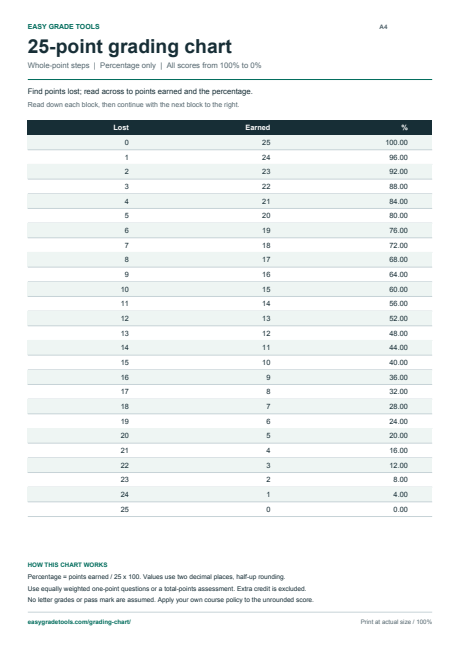
| Wrong / points lost | Correct / points earned | Percentage |
|---|---|---|
| 0 | 25 | 100.00% |
| 1 | 24 | 96.00% |
| 2 | 23 | 92.00% |
| 3 | 22 | 88.00% |
| 4 | 21 | 84.00% |
| 5 | 20 | 80.00% |
| 6 | 19 | 76.00% |
| 7 | 18 | 72.00% |
| 8 | 17 | 68.00% |
| 9 | 16 | 64.00% |
| 10 | 15 | 60.00% |
| 11 | 14 | 56.00% |
| 12 | 13 | 52.00% |
| 13 | 12 | 48.00% |
| 14 | 11 | 44.00% |
| 15 | 10 | 40.00% |
| 16 | 9 | 36.00% |
| 17 | 8 | 32.00% |
| 18 | 7 | 28.00% |
| 19 | 6 | 24.00% |
| 20 | 5 | 20.00% |
| 21 | 4 | 16.00% |
| 22 | 3 | 12.00% |
| 23 | 2 | 8.00% |
| 24 | 1 | 4.00% |
| 25 | 0 | 0.00% |
Download ready-made charts for 20, 25, 40, 50 and 100 points, plus a 20-point chart with half-point credit. Every score is included, from full marks to zero. No account or email address needed.
 Preview PDF
 Whole-point steps · 1 page
Whole-point steps · 1 page
Whole-point steps · 1 page
Whole-point steps · 1 page
Whole-point steps · 1 page
0.5-point steps · 1 page
These fixed sheets show percentages only, rounded half-up to two decimal places. They assume equally weighted one-point questions or a total-points assessment, with no extra credit. They do not use your saved grading settings or choose a letter grade or pass mark for you.
Print at actual size (100%) on the matching paper size. For a different total, custom scale or selected score range, use the calculator above and choose Print / Save as PDF. Read about grading with partial credit or rounding near a grade cutoff.
Enter the number of equally weighted questions and choose whole- or half-point rows. Set a smaller wrong-count range if you only need part of the chart. Wrong count can represent fractional points lost when you give partial credit.
Choose A4 or US Letter in the action strip, then use Print / Save as PDF. The print layout repeats table headings and omits the editing controls and advertisements. CSV export includes the displayed percentages, grade labels and the active rounding policy.
For 25 questions, the row with four points lost has 21 earned points and a score of 84%. A half-point loss gives 24.5 ÷ 25 × 100 = 98%. If questions have different maximum points, work from total points instead of simply counting wrong answers.